
Release notes 25.11
Last updated 11/20/25 with Verint Coaching 25.11 release
What's New
Coaching v2 Supports Premise-based WFE Systems
Coaching v2 is now available for customers with premise-based WFE systems! We have enhanced the Real Time System User Sync (RTSUS) to allow it to install into a premise WFE Integration Server. This will enable configured users to stay synchronized with the Real Time Coaching V2 Platform.
Enhancements
Supervisor Live CX and Intensity Sparkline Tooltips
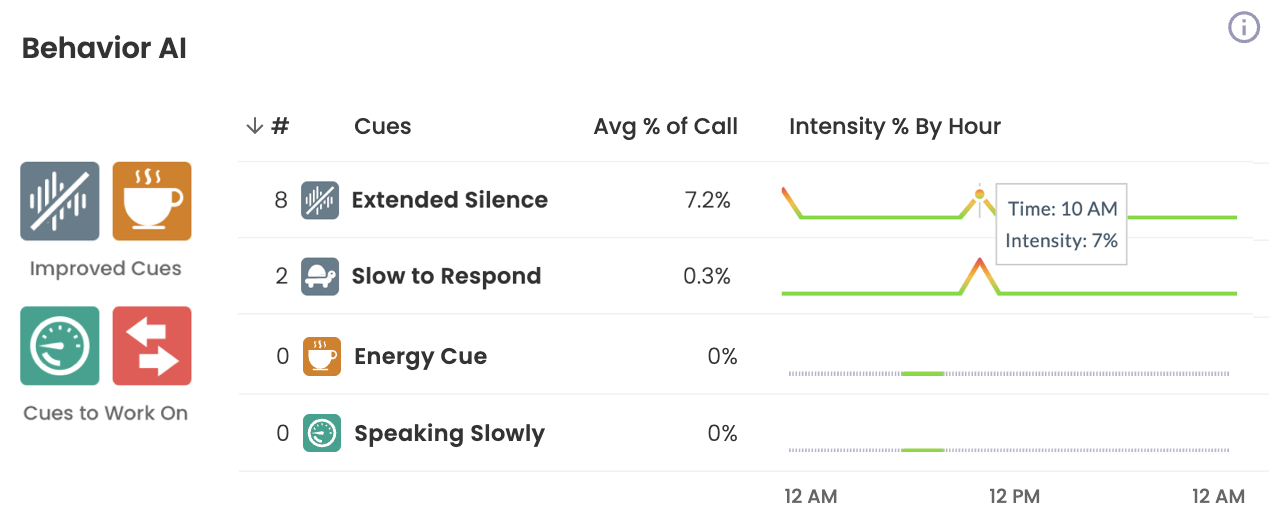
We’ve enhanced the Supervisor Live page to make sparklines more informative and actionable. Users can now mouse over sparklines in the Behavior AI and Customer Experience tables to view detailed hourly data in tooltips.
Team Summary → Behavior AI Table → “Intensity % By Hour” Sparkline
- Mousing over displays:
- Time: Hour span (e.g., Time: 11 AM)
- Intensity: Average intensity value for that hour (e.g., Intensity: 1%)
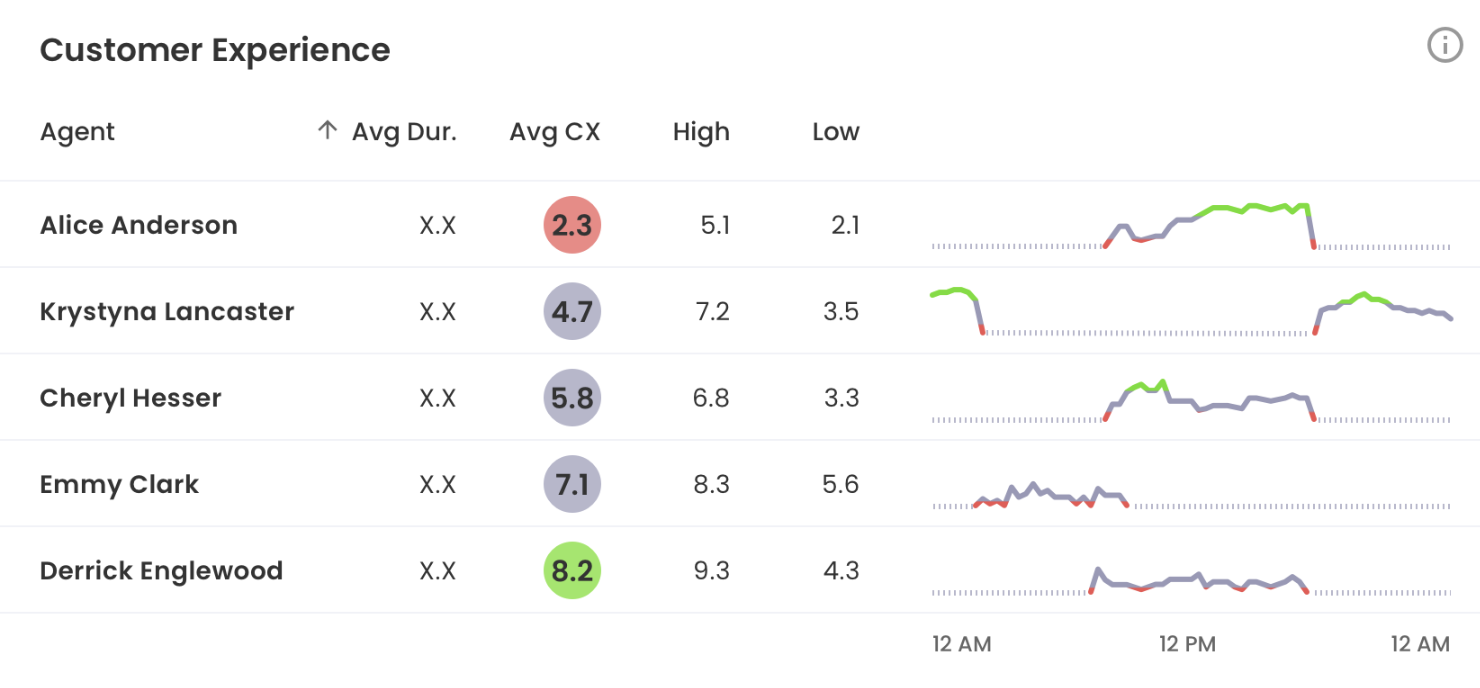
Agent Summary → Customer Experience Table → “CX by Hour” Sparkline
- Mousing over displays:
- Time: Hour span (e.g., Time: 11 AM)
- CX: Average CX value for that hour (e.g., CX: 1%)
Why this matters: Supervisors gain quick access to granular performance insights without leaving the dashboard, enabling faster and more informed coaching decisions.
Supervisor Live CX and Intensity Sparkline Design Improvement
We’ve improved the visual logic and color representation of sparklines in the Supervisor Live page's Behavior AI and Customer Experience tables to ensure accurate interpretation of instances where no data is available.
Team Summary → Behavior AI Table → “Intensity % By Hour” Sparkline
- No Calls Taken: Represented with a dotted line.
- Calls Taken: Represented with a solid line.
- Color Logic:
- 0% Intensity: Flat solid green line.
- Low → High Intensity: Gradient from green (low) to yellow (medium) to red (high).
- Spikes reflect increasing intensity values.
Agent Summary → Customer Experience Table → “CX by Hour” Sparkline
- No Calls Taken: Represented with a dotted line.
- Calls Taken: Represented with a solid line.
- Color Logic:
- Low CX (0 < CX < 3): Solid red line.
- Medium CX (3 ≤ CX < 8): Solid gray line.
- High CX (8 ≤ CX ≤ 10): Solid green line.
- Lines rise proportionally with CX score.
Why this matters: These changes improve readability and provide supervisors with clear, accurate trend indicators for both CX and Behavior AI intensity.
Security Fixes
CVE Updates
CVE-2020-8203 - Prototype pollution vulnerability in lodash before 4.17.20 via _.zipObjectDeep.
CVE-2021-3803 - nth-check is vulnerable to inefficient regular expression complexity leading to potential denial of service.
CVE-2022-0235 - node-fetch exposes sensitive information to unauthorized actors due to improper handling of redirects.
CVE-2025-27789 - Babel generates inefficient .replace polyfill for regex named capturing groups, causing quadratic complexity and DoS risk.
CVE-2025-54798 - Node.js tmp module allows arbitrary file writes via symlink in temporary directory creation (fixed in 0.2.4).
CVE-2025-5889 - Inefficient regex complexity in brace-expansion library leads to potential resource exhaustion (fixed in 4.0.1).
CVE-2025-6545 - Improper input validation in pbkdf2 allows signature spoofing via lib/to-buffer.js (affects 3.0.10–3.1.2).
CVE-2025-6547 - pbkdf2 improper input validation enables signature spoofing in versions ≤3.1.2.
CVE-2025-7339 - (No description available yet; check NVD for updates).
CVE-2025-7783 - Insufficiently random values in form-data enable HTTP Parameter Pollution (HPP) in versions < 2.5.4, 3.x, 4.x.
CVE-2025-9287 - Related to sha.js vulnerabilities; improper input validation enabling data manipulation (see advisory linkage).
CVE-2025-9288 - Improper input validation in sha.js allows input manipulation, impacting integrity and availability.